A buyer holds a piece under the counter light, turns it once, and asks for a photo to think about it. What happens in the next sixty seconds decides whether that conversation continues.
Most of the time what happens is a phone photo in overhead store lighting, sent as an attachment, arriving as a dim rectangle that flattens the stone. The buyer sees the piece at its worst, in a thread beside every other message in their day, and the decision cools on its own.
This covers the capture moments that sit outside the studio, what each one asks of your setup, and how the send travels from your hand to theirs while the piece is still fresh.
Which Selling Moments Move Faster With Capture on Hand?
Six moments carry capture pressure: the counter, the trade show booth, the video call, the bench approval, the social DM, and the evening catch-up session. Each one shares a property the studio session lacks. The buyer is already engaged, and the window closes on its own.
Speed of response is measurable here. Harvard Business Review research on sales lead response found that firms making contact within an hour of a query were nearly seven times as likely to qualify the lead as firms making contact an hour later, and more than sixty times as likely as firms waiting a full day. The same audit of 2,241 companies put the average response time at 42 hours.
Jewelry sharpens that curve. A buyer considering a five-figure piece is holding a decision that feels heavier by the hour, and the image you send is the entire basis for the reconsideration. Send a dim phone photo and you have handed them a reason to wait.
Alt text: Jeweler photographing a diamond ring at the store counter with a clip-on macro lens attached to a smartphone while the customer looks on

What Is GemSparkle?
GemSparkle is a clip-on LED loupe for smartphones and tablets, built for jewelry capture away from a studio. It attaches to the device already in your pocket and travels with it.
The specification that matters in a selling moment: adjustable lighting across 3000K to 7000K, a 5x macro and sparkle lens, three sparkle modes, three light colors, USB-C charging, and 106 grams of weight. Pricing starts at $299, and more than 20,000 jewelers use it.
The color temperature range is the part operators underrate. Store lighting sits wherever the building put it, usually warm and usually overhead, and it will cast every piece you photograph. A controlled light source at the lens overrides the room, so a white gold band reads as white gold in the buyer's thread rather than as champagne. The sparkle modes address the other half of the problem, since brilliance is a moving effect and a static frame under flat light leaves it invisible.
For the lighting standard behind these numbers, see our guide to jewelry lightbox lighting.

Where Does GemLightbox Mini Fit Alongside the Studio?
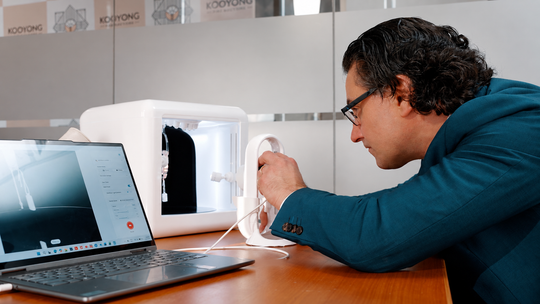
Mini extends your capture into the places the studio stays put, which is what makes it an addition to the bench rather than a change to it.
GemLightbox Mini is a compact AI jewelry lightbox at a $1,599 launch price. It carries 360 video, an open lid for taller pieces, one-tap capture, sparkle lights and infinity lighting, and it runs through the GemIQ app on iOS and Android. Software includes one-click Shopify upload, AI descriptions, GemBrush retouching, branded share pages and AI backgrounds. It ships with 30GB of cloud storage and a two-year warranty.
Here is the part worth stating plainly. GemLightbox Pro and GemLightbox Max remain the studio, and the studio keeps its job. Full collection runs, statement pieces, wholesale catalogs and ecommerce listings all belong there, and GemCam Pro remains the dedicated camera for true color and detail on colored stones and engraving work. Those sessions are planned, and planned work deserves the setup built for it.
What Mini adds is reach. The studio stays where you installed it, and selling happens at the bench, at the counter, at the kitchen table on a Sunday evening when a customer messages about a piece you finished on Friday. Mini follows the work into those moments. A jeweler running Max in the studio and Mini at the bench is covering two jobs rather than choosing between them.

How Do You Send a Piece to a Buyer in the Same Conversation?
Send a branded share link rather than an attachment, and the piece arrives as a page under your name.
An attachment lands as a file. A branded share page lands as an experience: your logo, your piece, the 360 rotation, the details rendered at full quality on their screen. The GemIQ app generates these from the capture, so the send happens in the same minute as the shot.
That difference compounds with what buyers now expect from a personal interaction. McKinsey research on personalization in retail found that 71% of consumers expect companies to deliver personalized interactions, and 76% report frustration when that expectation goes unmet. A branded page carrying the specific piece they held reads as personal attention. A generic file attachment reads as admin.
Three practices sharpen the send:
Capture two frames and one rotation. A macro detail for the stone, a wider frame for proportion, a rotation for brilliance. Three assets answer the three questions a buyer asks themselves overnight.
Send inside the hour. The HBR curve above is the reason. Same-conversation beats same-day, and same-day beats everything after it.
Keep your branding on every send. Recall belongs to the name on the page, and a buyer comparing three jewelers a week later will remember the one whose page looked like a store.
Alt text: Smartphone displaying a branded jewelry share page with a 360 degree rotation of a diamond ring and the jeweler's logo
What Does Trade Show Capture Look Like When It Works?
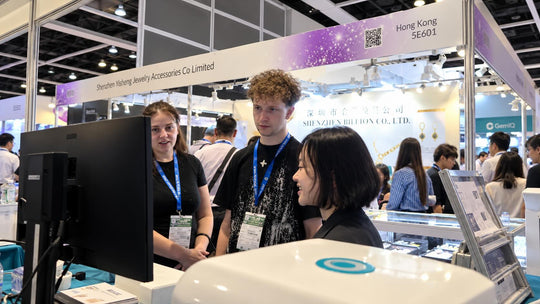
A booth capture workflow that works produces a sent asset before the buyer leaves the aisle.
Trade show floors combine the worst lighting conditions in the industry with the highest concentration of qualified buyers. Overhead halogen, neighboring booth colors bouncing off every surface, and a buyer with fifteen more booths to visit. The follow-up problem is structural: leads collected on the floor wait for someone to return to the office, and by then the buyer has seen forty other lines.
The workflow that beats it runs inside the conversation. Capture the piece the buyer picked up, with GemSparkle handling color temperature so the floor lighting stays off your stone. Generate the share link. Send it while they are still at the table. Their phone now carries your piece and your name, timestamped to the moment they were interested.
For booths running a table setup, Mini adds 360 rotation to the same workflow, so the buyer leaves with motion rather than stills. Both outputs feed the same catalog when you get home, which means your show capture doubles as listing capture.

How Does the Bench Handle Custom Approvals?
Custom approval runs on documented stages, and every stage a buyer approves from an image is a revision request you handled before the metal moved.
A custom build carries decision points: stone selection, wax or CAD sign-off, setting complete, polish complete, final. Each one is a moment where the client either confirms or redirects, and each redirect costs less the earlier it arrives.
Capture at the bench turns those points into a conversation instead of a phone call full of adjectives. The client sees the prong profile. They see the stone seated. They see the finish. Approval arrives in writing with an image attached to it, which also settles any disagreement about what was agreed.
Mini sits on the bench for this, since the piece moves from the setting block into the box and back in under a minute. For the full documentation standard across a custom build, see our guide to custom jewelry documentation.
Alt text: Partially completed custom engagement ring photographed at a jeweler's bench inside a compact lightbox for client approval
Which Setup Belongs in Which Selling Moment?
Match the setup to the moment rather than to the piece, since the moment determines how much time you have.
|
Selling moment |
What the buyer needs to see |
Setup on hand |
What goes out |
Time to send |
|
Store counter |
True metal color, stone detail at scale |
GemSparkle on your phone |
Two frames plus share link |
Inside the conversation |
|
Trade show booth |
Accurate color against floor lighting |
GemSparkle, Mini for table setups |
Stills plus rotation, share link |
Before they leave the aisle |
|
Video call with a remote client |
Live detail while you talk |
GemSparkle on a tablet |
Live view plus follow-up link |
Same call |
|
Bench custom approval |
Stage-by-stage build progress |
Mini at the bench |
Stage image with approval request |
Same working session |
|
Social selling and DMs |
Brilliance in motion, thumb-stopping |
Mini for rotation, GemSparkle for macro |
Rotation plus macro detail |
Same day |
|
Evening catch-up session |
Clean listing-grade output at home |
Mini |
Catalog-ready images and video |
Overnight to listing |
|
Full collection run |
Consistency across the catalog |
GemLightbox Pro, Max, GemCam Pro |
Complete catalog with auto-descriptions |
Planned session |
The last row is the one to read alongside the rest. The studio session stays exactly where it is, and everything above it covers ground the studio stays out of. Operators running both are covering the planned work and the live work with the right tool on each.
For the criteria behind choosing a studio setup, our imaging setup selection framework walks through it.
Ready to put capture in your pocket? Explore GemSparkle.
Sources
-
Harvard Business Review, Oldroyd, McElheran and Elkington, "The Short Life of Online Sales Leads," March 2011. https://hbr.org/2011/03/the-short-life-of-online-sales-leads
-
McKinsey and Company, "The value of getting personalization right or wrong is multiplying." https://www.mckinsey.com/capabilities/growth-marketing-and-sales/our-insights/the-value-of-getting-personalization-right-or-wrong-is-multiplying
-
GemIQ product specifications, GemSparkle and GemLightbox Mini.