Your lighting setup earns its keep on the fortieth piece of the day, once the settings have stayed put and every image in the run matches the one before it. That consistency is what turns a catalog into something a buyer trusts on sight.
This walks through the lighting decisions that hold across a full session: color temperature by metal family, even highlights on polished surfaces, sparkle that carries on faceted stones, and the throughput that follows once the setup locks in.
What Locked-In Lighting Looks Like Across a Full Catalog Run
A locked-in setup means one thing in practice: the piece changes, the light stays exactly where it was.
Same color temperature. Same brightness. Same camera position. Same distance. When those four hold steady, a hundred images share one visual language, and a customer scrolling your collection page reads the whole set as one collection rather than a hundred separate sessions.
The gain compounds on the editing side. Consistent input means one adjustment applies across the batch, so a run that used to absorb an afternoon of individual corrections moves through in a single pass.
Light behavior on jewelry has clear vocabulary worth borrowing. GIA describes three appearance-based qualities in a finished stone: brightness, the white light returning to the eye, fire, the dispersion of light into spectrum colors, and scintillation, the pattern of light and dark that flashes as the stone moves (GIA 4Cs Cut). Your lighting decisions determine how much of each one survives the trip to the screen.

Color Temperature Choices That Match Your Metals
Color temperature is the single setting that most changes how a metal reads on screen, and it rewards a decision made once per metal family rather than per piece.
Warm range, roughly 3000K to 4000K. Yellow gold and rose gold hold their warmth here. The richness a customer sees at the counter carries through to the image.
Neutral range, roughly 5000K to 5500K. Platinum, white gold and sterling silver read true. This is the daylight-adjacent zone where white metals stay white rather than picking up a cast.
Cool range, roughly 6000K to 7000K. Icy white reads cleanest here, which serves colorless diamonds and pieces where you want the stone leading rather than the setting.
GemSparkle spans 3000K to 7000K, so a single dial covers all three ranges across a mixed tray.
Color accuracy also depends on the quality of the light itself, measured as CRI. Values above 90 are the working standard for color-critical photography, with the R9 red score mattering as much as the headline number for faithful warm tones (Zoner: CRI and color fidelity in photography). GemLightbox Mini rates CRI 95 and above, which puts it inside that color-critical band.
Operator move: write your chosen setting beside each metal family on a card taped inside the studio. Anyone on your team then reproduces the same result on their first try.
Even Highlights on Polished Metal and Reflective Settings
Polished metal mirrors whatever surrounds it, which makes the shape and spread of your light source the deciding factor in how highlights land.
A broad, diffused source wraps the piece and produces long, soft highlights that follow the form of the band. GemLightbox Max builds this in with 360 Infinity Lighting across twelve LED points, so light arrives from every direction at once and the metal reads evenly around its full circumference.
Three habits keep highlights clean across a run:
- Center the piece. Sitting the piece in the middle of the capture space gives light the same path in from all sides.
- Choose matte holders. Holders with a flat finish stay quiet in the frame and keep attention on the metal.
- Lift with the aerial turntable. Elevating the piece opens space underneath, which separates the item from its surface and gives the outline definition.
For pieces with mixed finishes, brushed shanks beside high-polish bezels, an even wrap serves both surfaces in one exposure.

Sparkle That Reads on Faceted Stones
Sparkle works differently from metal. Where polished metal wants breadth and diffusion, scintillation comes alive under crisp, directional points of light that produce the sharp contrast between bright and dark facets.
That gives you two distinct captures worth having for every stone-set piece:
The diffused frame. Broad light, even metal, clean stone color. This is your primary catalog image, the one that carries accurate detail.
The sparkle frame. Point lighting introduced to fire the facets. GemSparkle offers three sparkle modes for this, and GemLightbox Mini includes dedicated sparkle lights alongside its main array.
Motion adds the third dimension. Since scintillation appears as the piece or the light moves, a still frame captures one instant of a moving effect. A 360 video shows the full play of light as the stone turns, which is why turntable video carries so much weight on stone-set inventory. Burst Mode on GemLightbox Pro produces four photos plus a video in fifteen seconds, giving you both the still set and the motion asset from one pass.
Smartphone Capture Inside the Lightbox
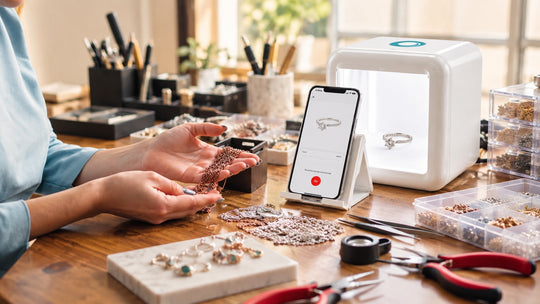
The lightbox does the optical work. Your phone records what the lightbox has already arranged, which is why one-click capture through the GemIQ App produces catalog-grade results on the first attempt.
Four habits raise the floor on every phone capture:
- Wipe the lens. Thirty seconds at the start of the session protects every frame that follows.
- Lock exposure and focus. A locked meter keeps frame forty matching frame one as reflective pieces move through.
- Hold one distance. The phone stand keeps scale consistent, so rings across a collection appear at comparable size on the product grid.
- Capture through the app. Auto-catalog files each image against the right piece as you shoot, which means the organizing work finishes at the same moment the shooting does.

Where GemCam Pro Carries True Color and Detail
GemCam Pro is the dedicated jewelry camera in the GemIQ imaging system, built for the pieces where color fidelity and fine detail carry the sale.
Colored stones are the clearest case. The precise separation between a Ceylon sapphire and a Burmese ruby, the exact green of a tourmaline, the subtle zoning in a bicolor stone: GemCam Pro captures these in one click with true color and detail intact. Same for engraving depth, milgrain edges, pavé seat definition and hallmark clarity on high-value inventory.
It pairs directly with GemLightbox Pro and GemLightbox Max, and the Elite Kit bundles combine both into one purchase. Operators running consignment, high-ticket bridal or colored stone inventory generally treat the camera as the standard tool for that portion of the catalog and the phone as the fast lane for volume basics.

Throughput Once the Setup Stays Put
Speed arrives from settings that stay put, so the sequence of your session matters as much as the equipment in it.
Batch by metal family. Group all yellow gold, shoot it, then move to white metals. One color temperature adjustment per batch replaces one per piece.
Batch by piece type. Rings together, then pendants, then earrings. Camera height and holder choice hold steady through each group.
Let the software close the loop. AI background removal, GemBrush retouching and auto-catalog run on capture rather than afterwards. GemLightbox Max adds AI-generated descriptions, Shopify upload and RapNet integration, so an image moves from capture to live listing inside one workflow.
A jeweler shooting a fifty-piece drop this way typically finishes capture and publishing in the same session that used to cover capture alone.
Carrying the Same Standard Beyond the Studio
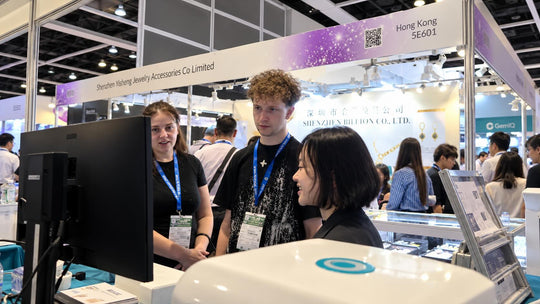
Selling happens in places the studio stays put through: at the bench mid-setting, across the counter with a customer present, at a trade show table, in a follow-up message the same evening a client asks for one more angle.
GemLightbox Pro and GemLightbox Max hold the studio position, handling full catalog days with the largest capture space and the deepest feature set. GemLightbox Mini travels alongside them at 218 by 210 by 22mm and 2.2kg, bringing 360 video, sparkle lights, one-tap capture, AI descriptions and Shopify upload to those everyday selling moments. GemSparkle clips onto a phone for the moments that arrive with even less notice.
Running the same color temperature logic across all of them means an image captured at the counter sits comfortably beside one captured in the studio.
Your Lighting Standard Checklist
Lock these once and hand them to your team:

Set the standard once and every session after it starts from a known position.
Sources
- GIA, Cut, GIA 4Cs — https://www.gia.edu/gia-about/4cs-cut
- GIA 4Cs, GIA Diamond Cut Grade: 6 Things to Know — https://4cs.gia.edu/en-us/blog/gia-diamond-cut-grade-six-things-to-know/
- Zoner, CRI: Color Rendering Index, Color Fidelity in Photography — https://learn.zoner.com/cri-color-rendering-index-color-fidelity-in-photography/
- FSG, What is Color Rendering Index (CRI)? — https://fsg.com/what-is-color-rendering-index-cri/
- GIA, GIA Researchers Evaluate 'Light Performance' and Diamond Cut — https://www.gia.edu/gia-news-research/gia-researchers-evaluate-light-performance-diamond-cut