A buyer decides how much your jewelry is worth in the half second before they read a single word. They form that judgment from your images, and they form it across the whole grid at once rather than one listing at a time.
That makes consistency a commercial variable. This covers what gives a piece dimension on screen, how buyers read scale, the shot sequence each SKU earns, the feed rules your images meet, and the batching that holds all of it steady across a catalog.
Why Does Catalog Consistency Affect Jewelry Sales?
Buyers form a price expectation from your collection grid before they open a single listing. When scale, background, metal warmth and shadow direction hold steady across every piece, the grid reads as one curated collection and the buyer moves straight to choosing.
Open your collection page and look at it the way a buyer does, as a grid rather than a list.
The rings sit at comparable size. The backgrounds match. The metal reads the same warmth across every yellow gold piece. The shadows fall the same direction. When those hold, the grid reads as one curated collection and the buyer moves straight to choosing.
Images carry more of that decision than most catalogs account for. Baymard Institute research finds that around 56% of shoppers begin on a product page by exploring the images, ahead of the title and the description, and that product lists need three or more images per item to give shoppers enough visual information to judge from (Baymard Institute).
Consistency also compounds on the production side. A matched set means one adjustment covers the batch, one template covers the crop, one preset covers the export.
What Gives a Jewelry Photo Depth on Screen?
Four capture decisions carry dimension: camera angle, ground contact shadow, elevation for outline separation, and focus depth through the whole piece. A flat image and a dimensional image often come from identical lighting, with these four settings accounting for the difference.
Camera angle. A straight top-down view flattens a band into a circle. A three-quarter view around 30 to 45 degrees shows the profile, the shank thickness and the setting height all at once, which is how a hand sees the piece.
Ground contact. A soft contact shadow beneath the piece tells the eye where the surface is. Grounding gives the object weight and stops it floating.
Separation. Elevating the piece on the aerial turntable opens space underneath and gives the outline a clean edge against the background.
Sharpness through the whole piece. Jewelry has depth measured in millimeters, and a shallow focus plane leaves the back of a setting soft. Depth that carries front to back reads as craftsmanship.
Lighting sets the foundation underneath all four. Color temperature by metal family, diffused wrap for polished surfaces and sparkle modes for faceted stones are covered in full in our lightbox lighting standard.

Which Subtle Effects Improve Jewelry Portfolio Photos?
Eight repeatable adjustments lift portfolio images: three-quarter hero angle, contact shadow, elevation, deep focus, consistent frame margin, controlled base reflection, micro-rotation for the highlight, and a motion frame. Each one is small on a single piece and compounding across a full catalog.
These are worth locking into your standard.
1. Three-quarter angle as the hero. Reserve the top-down view for the secondary slot and lead with the angle that shows profile.
2. Contact shadow at the base. A soft grounded shadow adds weight. Keep the density identical across the catalog so the whole grid matches.
3. Elevation for outline separation. The aerial turntable lifts the piece and sharpens its silhouette against the background.
4. Deep focus through the setting. Sharpness carrying from the front facet to the back gallery reads as quality on zoom.
5. Consistent frame margin. Hold the piece at a steady percentage of the frame across every listing so the grid stays visually even.
6. Controlled base reflection. A soft reflection under the piece adds polish. Matched intensity across the catalog keeps it looking intentional.
7. Micro-rotation for the highlight. A few degrees of turn often lands a facet flash exactly where it reads best. Note the position and repeat it per piece type.
8. A motion frame per piece. A 360 video gives the buyer the rotation they would perform in their hand, which stills alone leave to the imagination.

How Do You Show Jewelry Scale in Product Photos?
Three methods settle size for a buyer: a worn frame, a consistent crop ratio per piece type, and a stated measurement callout in the image set. A stone that reads large in isolation reads accurately beside a reference.
Scale remains one of the widest open gaps in ecommerce. Baymard benchmarks put around 28% of ecommerce sites still lacking in-scale images and around 25% lacking sufficient image resolution or zoom for shoppers to evaluate a product properly.
Three ways to give it:
A worn frame. A piece on a hand or ear settles the size question in one glance.
A consistent crop ratio by piece type. All rings framed the same way means a 2mm band and a 6mm band show their real difference on the grid.
A stated measurement in the image set. A clean callout frame carrying band width, stone dimensions and total length gives the detail-driven buyer what they came for.
Getting scale right ahead of purchase also protects your margin after it, since size surprises are among the most common reasons jewelry comes back.
How Many Photos Does a Jewelry Listing Need?
Six assets per SKU covers what buyers look for: three-quarter hero, top-down, profile, macro detail, scale reference and a 360 video. Baymard Institute testing shows product lists need at least three images per item, and Google Merchant Center accepts up to ten additional images per product, so six sits comfortably inside both.
Set the sequence once and every piece moves through the same path.
| Slot | Shot | Purpose |
|---|---|---|
| 1 | Three-quarter hero | The primary listing image and the grid thumbnail |
| 2 | Top-down | Face pattern, stone layout, overall shape |
| 3 | Profile | Setting height, gallery, band thickness |
| 4 | Macro detail | Hallmark, engraving, pavé seats, milgrain |
| 5 | Scale reference | Worn frame or measurement callout |
| 6 | 360 video | Motion, sparkle behavior, full rotation |
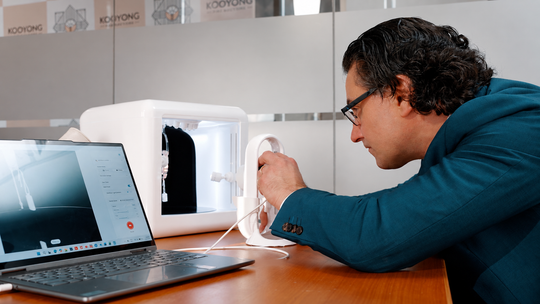
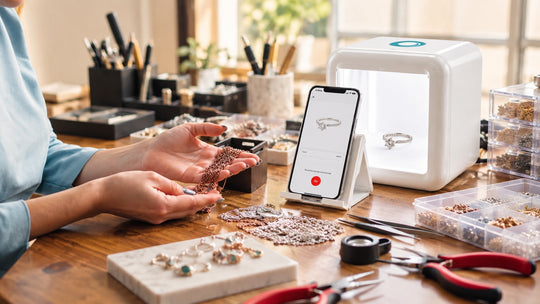
Six assets per SKU sounds heavy until the capture runs as one pass. Burst Mode on GemLightbox Pro, the plug-and-play AI lightbox built for one-click smartphone capture, produces four photos plus a video in fifteen seconds. GemLightbox Max, the flagship AI lightbox, adds 2.5x the capture area for statement pieces and full collection runs.
GemCam Pro, the dedicated jewelry camera built for true color and detail capture, carries slot 4 on the inventory where detail decides the sale: colored stones, engraving depth, hallmark clarity and high-value bridal.
What Are Google's Product Image Requirements for Jewelry?
Google Merchant Center asks that the product fill most of the frame, keeps promotional overlays and watermarks off the main image, and enforces a 500 x 500 pixel minimum on all product images from January 31, 2027. A clean white or neutral background is recommended for the main image, with lifestyle frames going in the additional image slots.
Your images live on your own product pages and inside shopping feeds, and the feed has published rules worth designing to from the start.
Google Merchant Center recommends the product fill the majority of the frame, keeps promotional overlays and watermarks off the main image, and has announced a minimum image size of 500 x 500 pixels for all product images with enforcement beginning January 31, 2027 (Google Merchant Center Help). Merchant Center also supports up to ten additional images per product, which maps cleanly onto the six-slot sequence above with room to spare.
Practical takeaways:
- Capture at high resolution so both zoom and feed thresholds stay comfortable
- Keep a clean white or neutral background as the default on slot 1
- Reserve lifestyle and contextual frames for the additional image slots
- Hold text, badges and price callouts on the page rather than inside the image file
AI background removal in the GemIQ software delivers a matched neutral background across the catalog on capture, which keeps every listing feed-ready as it publishes.
How Do You Keep Jewelry Photos Consistent Across a Catalog?
Consistency comes from sequence and templates rather than from care applied per piece. Batch by metal family then piece type, hold one crop template and one export preset per piece type, and let auto-catalog file each image against its SKU at capture.
Group by metal family, then piece type. One setup adjustment covers the batch. Rings together, then pendants, then earrings.
Fix the crop template per piece type. Same frame margin every time means the grid stays even.
Hold one export preset. Matching dimensions, format and compression across the catalog keeps page weight predictable.
Let auto-catalog file as you shoot. Every image lands against the right SKU at capture, so the organizing finishes when the shooting does.
Publish from the same workflow. GemLightbox Max generates AI product descriptions, pushes directly to Shopify and integrates with RapNet, which takes a piece from capture to live listing in one line.
How Do You Add Lifestyle Jewelry Images to a Listing?
GemStudio generates model and lifestyle frames from a single product photo, with editorial styles, one-click skin tone across light, medium and deep, and built-in retouching. That covers the scale reference slot and the lifestyle feed slots from assets already captured in the studio.
Studio images establish the facts. Context images answer the question buyers ask next, which is how a piece looks in wear.
GemStudio, the AI software that produces model and lifestyle visuals from a single product photo, generates these frames with editorial styles in Model Image Pro, one-click skin tone across light, medium and deep, and built-in retouching. That covers the slot 5 worn frame and the lifestyle feed slots from assets you already captured, replacing model shoots that run $1,500 to $3,000 and cutting content production time by 40 to 60%. Listings carrying lifestyle visuals also see around 22% fewer returns, which lands directly on margin.
Pair it with GemCam Pro and the input quality carries all the way through to the generated frame.

Sources
- Baymard Institute, Product Lists & Search Results Thumbnail Best Practices — https://baymard.com/blog/secondary-hover-information
- Google Merchant Center Help, How to fix: Image too small — https://support.google.com/merchants/answer/12159030?hl=en
- Google Merchant Center Help, Image link [image_link] — https://support.google.com/merchants/answer/6324350?hl=en
- Google Merchant Center Help, Additional image link [additional_image_link] — https://support.google.com/merchants/answer/6324370?hl=en
- Google Merchant Center Help, Lifestyle image link [lifestyle_image_link] — https://support.google.com/merchants/answer/9103186?hl=en
- Baymard Institute benchmark data on product image resolution and in-scale imagery, as reported in How product image quality impacts e-commerce conversion and returns — https://letsenhance.io/blog/all/product-image-quality/