A still image shows a buyer what a piece looks like. Motion shows them what it does, which on jewelry is most of the value.
Sparkle appears as light moves across a facet. A profile reveals itself as the band turns. Neither survives a single frame. This covers what motion earns on a product page, which format fits which piece, how the capture runs, and where the asset goes once you have it.
Why Does Motion Belong on a Jewelry Product Page?
Motion carries the two things jewelry sells on that a still frame holds still: sparkle behavior and dimensional form. It also answers the rotation a buyer would perform with the piece in hand, which is the gesture an online listing otherwise leaves to imagination.
The commercial evidence sits with the platforms. Shopify reports that Rebecca Minkoff found visitors who interacted with a 3D model were 44% more likely to add a product to their cart and 27% more likely to place an order, with AR viewers reaching 65% more likely to purchase (Shopify). Shopify's own platform-level data puts conversion on pages carrying 3D and AR content around 94% higher than pages with static images alone, which reads as directional rather than controlled, though the direction is consistent across every study that has looked.
For jewelry the case is stronger than for most categories, because scintillation is a moving effect by definition. A still frame captures one instant of it.

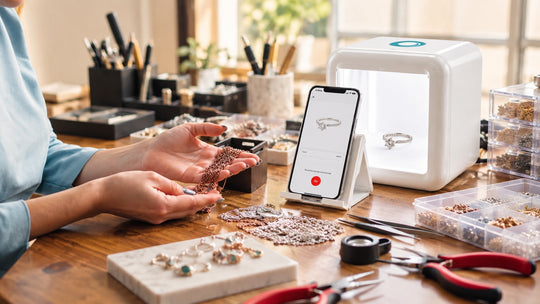
Videos captured in the GemLightbox Mini
What Kind of Motion Works Best for Jewelry?
Three formats cover the category: a full 360 turntable rotation, a short sparkle clip, and a worn motion frame. Each answers a different question, and most pieces earn the first two.
360 turntable rotation. The workhorse. A full revolution shows profile, gallery, shank thickness and setting height in one asset, which replaces four separate still angles for the buyer who wants to inspect.
Sparkle clip. A shorter pass with directional light where the facets fire. This suits stone-set inventory and performs hardest on social, where the flash is what stops a scroll.
Worn motion. A hand or ear in movement settles scale and drape at the same time. This carries the most weight on statement pieces and layered designs.
Match the format to the piece. Plain bands and stackers earn the rotation. Stone-set pieces earn the rotation plus the sparkle clip. Statement and bridal earn all three.
How Do You Capture a 360 Jewelry Video?
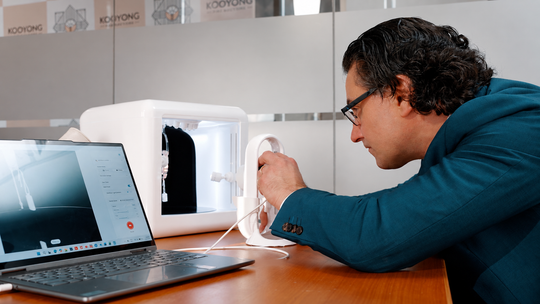
The turntable and the app do the work: the piece rotates, the app records the full revolution, and the output arrives ready to publish. Capture runs in the same pass as your stills rather than as a separate session.
Burst Mode on GemLightbox Pro, the plug-and-play AI lightbox built for one-click smartphone capture, produces four photos plus a video in fifteen seconds. That single pass covers the still slots and the motion slot together, which is what keeps six assets per SKU realistic across a full catalog.
GemLightbox Max, the flagship lightbox, adds 2.5x the capture area, so statement pieces, layered necklaces and full collection runs rotate with room to spare.
Three habits protect a rotation:
- Center the piece on the turntable axis. Off-center placement makes the piece drift across the frame as it turns.
- Hold one rotation speed across the catalog. Matched pacing keeps the whole set feeling like one collection.
- Lock exposure before the pass. A locked meter keeps brightness steady as reflective surfaces swing through the light.
Lighting decisions sit underneath all of this. Color temperature by metal family, diffused wrap for polished surfaces and sparkle modes for faceted stones are covered in full in our lightbox lighting standard.

How Long Should a Jewelry Product Video Be?
Eight to fifteen seconds covers a full rotation at a pace a buyer can follow, and that length travels across every channel you publish to. Shopify accepts far more, which makes duration a choice rather than a constraint.
Shopify supports up to 250 combined images, 3D models and videos per product, with uploaded video in MP4 or MOV up to 4K resolution and 1GB (Shopify Help Center). The ceiling is generous. The useful number is much lower.
Practical durations by use:
| Use | Length | Note |
|---|---|---|
| Product page rotation | 8 to 15 seconds | One full revolution, steady pace |
| Sparkle clip | 5 to 8 seconds | Enough for two or three facet flashes |
| Instagram and TikTok | 6 to 12 seconds | Vertical crop, loop-friendly |
| Email and messaging | 5 to 8 seconds | Short enough to autoplay as a preview |
One capture serves all four with different exports.
Where Do Motion Assets Go Across Your Channels?
One rotation feeds the product page, the social feed, the email and the direct client message, with the crop changing rather than the capture. Treating motion as a multi-channel asset is what makes the fifteen seconds of capture pay four times over.
Product page. The rotation sits in the media gallery alongside your stills. Keep a still frame as the featured item so the collection grid stays consistent, and let the video carry the inspection.
Social feed. Vertical crop for Reels and TikTok. The sparkle clip generally outperforms the full rotation here, since the flash lands inside the first second.
Email and campaigns. A short loop as a preview gives a new arrival announcement something a static hero image leaves out.
Direct client follow-up. This is where motion earns its keep for independent jewelers. A client asks about a piece in the evening and a rotation arrives in the thread while the interest is live.
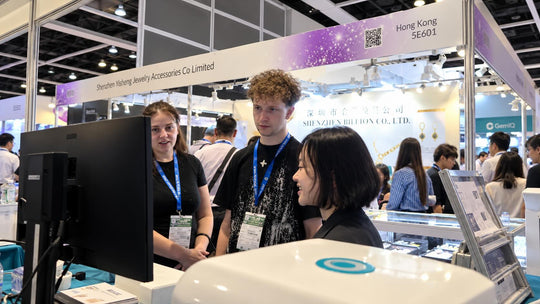
That last one runs beyond the studio, which is where GemLightbox Mini extends the workflow. At 218 by 210 by 22mm and 2.2kg it brings 360 video, sparkle lights and one-tap capture to the bench, the counter, the trade show table and the evening follow-up, alongside the studio that handles full catalog days.