Custom work runs on approvals. A client signs off on a rendering, then a wax, then a set stone, then the finished piece, and each of those moments waits on an image traveling from your bench to their inbox.
Every one of those handoffs is a place where days accumulate. This covers where the time actually sits in a custom project, what to document at each stage, and how the capture step compresses when the images arrive right the first time.
Where Does Time Actually Go in a Custom Jewelry Project?
The bench work moves faster than the approval loop around it. CAD modeling runs two to five days for most pieces, while client review of that model adds another three to seven days per round, and most jewelers build two to three revision rounds into their estimates.
Industry lead time estimates from American jewelers put the average at around 21 days from final design approval to a delivered bespoke piece, with simple pendants landing near 14 days and high jewelry involving rare stones or extensive handwork running past 60 (Custom Jewelry Design).
Run the arithmetic on the review side. Three revision rounds at five days of client review each is fifteen days spent waiting rather than making. That window is the one you control, because a client who can see the piece clearly answers faster than a client who is squinting at a dim photo taken at the bench.
Image quality is a scheduling variable in custom work, which is a different job from the one it does in a catalog.

What Should You Document at Each Stage of a Custom Build?
Five capture points carry a custom project: intake, wax or prototype, post-cast, post-setting, and finished piece. Each one answers a question the client is about to ask, and capturing it as you go removes the scramble later.
Intake. The client's existing piece, heirloom stone or reference material, photographed on arrival with hallmarks and any existing damage visible. This is your record of condition before your bench touches anything.
Wax or prototype. Proportion, stone spread and how the piece sits. The client approves shape here, so profile and top-down both matter.
Post-cast. The raw metal before setting. Useful for confirming the client's chosen finish and for your own production record.
Post-setting. Stone seat, pavé alignment, prong placement. This is the stage where a client's specific request either landed or needs adjusting, and a sharp macro answers it in one exchange.
Finished piece. Full catalog treatment, since this asset serves approval, delivery, portfolio, social proof and the appraisal record simultaneously.
Stage documentation also gives you a build history. When a client returns in three years for a resize or a remake, the file already holds every measurement and finish decision.
How Does Photography Speed Up Client Approval?
A client approves on the first look when the image shows true color, real detail and accurate proportion, and asks for another photo when it falls short. Each of those follow-up requests costs a full review cycle.
This is the specific job GemCam Pro handles. As the dedicated jewelry camera in the GemIQ range, it captures true color and fine detail in one click, which matters most on exactly the questions custom clients ask: does the sapphire read the blue we discussed, is the milgrain the width I chose, did the engraving depth come out as specified, does the prong sit the way the CAD showed.
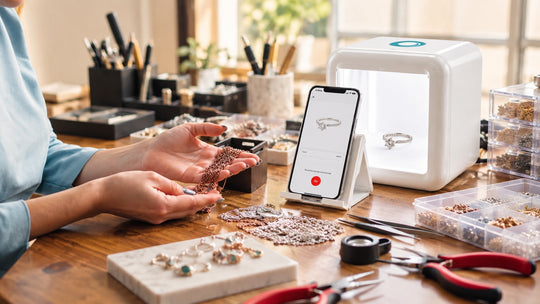
It pairs with GemLightbox Pro, the plug-and-play AI lightbox, or GemLightbox Max, the flagship lightbox with 2.5x the capture area for statement and layered pieces. The Elite Kit Pro combines GemCam Pro with GemLightbox Pro at $6,499, which is the complete bench-to-client setup as a single purchase rather than assembled over time.
Two practical gains follow:
Color questions settle in one exchange. Colored stones are where photo accuracy decides whether an approval closes or reopens, and true color capture removes the round trip.
The approval asset is already the portfolio asset. The image you send for sign-off is catalog-grade, so nothing gets reshot later for the website or the feed.
For work in progress at the bench itself, GemLightbox Mini travels to where the piece is. At 218 by 210 by 22mm and 2.2kg it documents a wax on the bench or a stone in its seat mid-build, alongside the studio setup that handles intake and finished pieces.

What Records Protect You After the Piece Leaves?
The finished-piece images you capture for approval double as the client's insurance record and your own proof of what left the bench. Both matter more on custom work, because a bespoke piece has no equivalent listing to reference for replacement value.
Jewelers Mutual notes that a written appraisal includes a detailed description and photographs of the piece alongside an estimate of current retail replacement value, and that this is the document a client hands to their insurer (Jewelers Mutual). On a one-off piece, the photograph carries the identification work that a model number does elsewhere.
Three records worth keeping on every custom job:
- Hallmark and maker's mark captured clearly, since these establish origin
- Stone detail at macro showing inclusions or characteristics that identify the specific stone
- Full piece from multiple angles at high resolution for replacement reference
Add the finished piece in wear and the client gets the last thing they want before delivery. GemStudio, the AI software that produces model and lifestyle visuals from a single product photo, generates that frame from the approval image you already captured.
What Does a Compressed Documentation Workflow Look Like?
The change is capturing once at studio quality rather than capturing quickly and reshooting when questions come back. Here is the same project run both ways.
| Stage | Ad hoc documentation | Single-pass documentation |
|---|---|---|
| Intake | Phone snap at the counter, filed loosely | Studio capture with hallmarks and condition visible, filed to the job |
| Wax approval | Photo sent, client asks for a clearer angle, second photo follows | Profile and top-down sent together, client approves |
| Client review | 5 to 7 days including the follow-up request | 3 to 5 days, single exchange |
| Post-setting | Macro attempted at the bench, detail reads soft | GemCam Pro macro, stone seat and prong placement clear |
| Second review | Another clarifying exchange, 3 to 5 days | Approved on first look |
| Finished piece | Reshot properly for the portfolio after delivery | Approval image already catalog-grade |
| Portfolio and social | Separate session scheduled later | Assets already in hand |
| Insurance record | Assembled from whatever exists | Complete stage record already filed |
The bench work is identical in both columns. What changes is how many review cycles sit between the stages, and each cycle removed is three to seven days returned to the schedule.
Across a book of custom work that compounds. Two revision rounds saved per project, across a year of commissions, is a meaningful amount of capacity recovered from the calendar rather than from the bench.
Sources
- Custom Jewelry Design, How Long Does It Take to Create a Custom Jewelry Piece — https://customjewelrydesign.net/how-long-does-it-take-to-create-a-custom-jewelry-piece
- Jewelers Mutual Group, Getting a jewelry appraisal for insurance: What you need to know — https://www.jewelersmutual.com/resources/individuals/appraisals/getting-jewelry-appraisal-insurance-what-you-need-to-know
- Tashvi, Understanding the Custom Jewelry Timeline: From Concept to Hand — https://tashvi.ai/blog/custom-jewelry-timeline-concept-to-hand
- Custom Jewelry Design, How Does the Custom Jewelry Design Process Work From Start to Finish — https://customjewelrydesign.net/how-does-the-custom-jewelry-design-process-work-from-start-to-finish