Most comparisons of jewelry imaging tools start with a list of products. That is the wrong end of the problem, because the right setup depends on what you publish, how often, and where the capture actually happens.
Start with the criteria instead. This covers what imaging software does inside a jewelry workflow, the seven things worth evaluating before you commit, what Etsy and Shopify each ask of your images, what the spend looks like, and a decision table matching setups to situations.
What Does Jewelry Imaging Software Actually Do?
Jewelry imaging software handles the steps between a captured frame and a published listing: background removal, retouching, cataloging, format export and channel upload. The capture hardware produces the frame, and the software decides how much manual work sits between that frame and a live product page.
Four jobs make up the category:
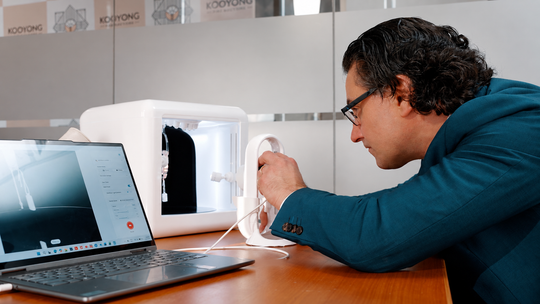
Capture control. Exposure, white balance, turntable timing and burst sequencing, handled through an app rather than through camera menus.
Post-processing. Background removal, retouching, color correction and export sizing, applied at capture rather than in a separate editing session.
Cataloging. Files landing against the right SKU as you shoot, which removes the naming and sorting work that usually happens later.
Publishing. Direct upload to Shopify, marketplace feeds or trade platforms, with descriptions and metadata attached.
A setup that handles the first two and stops there still leaves you sorting files and uploading manually, which on a fifty-piece drop is most of the labor.
What Should You Evaluate Before Choosing a Jewelry Imaging Setup?
Seven criteria separate setups in practice, and each one has a cost attached when it is missing. Work through them against your own catalog rather than against a feature list.
1. Color accuracy on metals and stones. Whether yellow gold reads warm, platinum reads neutral and a sapphire reads the blue it actually is. Missing this costs you returns and reshoots, and on colored stone inventory it decides whether a sale closes.
2. Consistency across sessions and operators. Whether image forty matches image one, and whether a second person on your team produces the same result. Missing this costs you a collection page that reads as a year of separate afternoons.
3. Throughput. Pieces per hour once the setup stays put. Missing this shows up as a backlog of unlisted inventory rather than as a quality issue.
4. Motion capability. Whether 360 rotation is part of the same pass or a separate project. Missing this costs you the asset that carries sparkle and dimensional form.
5. Publishing integration. Whether images reach Shopify, your marketplace feeds and trade platforms from inside the workflow. Missing this costs you the hours between a finished image and a live listing.
6. Lifestyle and model output. Whether you can show a piece in wear from studio assets you already have. Missing this means either a model shoot budget or listings that leave scale unanswered.
7. Where capture happens. Whether the setup reaches the bench, the counter and the trade show table, or waits in the studio. Missing this costs you the sale that needed an image while the client was still interested.
Rank those seven against your own operation before you look at any product. Most setups do three or four of them well, and the ones you skip are the ones that will define your week.
What Do Etsy and Shopify Require From Your Images?
Etsy recommends listing photos at 2000 pixels or more on both dimensions, with the first photo at 635 pixels minimum to hold search position, and flags that files above 1MB may fail to upload (Etsy Help). That pairing is the interesting part, since it asks for high resolution and a modest file size in the same breath, which makes compression quality a real requirement rather than a nicety.
Shopify sets no equivalent ceiling, though its CDN stores your original at whatever size you upload, so the compression decision stays yours there too.
Google Merchant Center adds a third set of rules for anything feeding Shopping. The product fills most of the frame, promotional overlays and watermarks stay off the main image, and a 500 x 500 pixel minimum applies to all product images (Google Merchant Center Help).
The practical read across all three: export at 2000 to 2048 pixels, compress to sit comfortably under 1MB, keep the main image clean of text and badges, and hold one export preset so every channel receives the same file. A setup that produces web-ready output at capture handles this automatically. One that produces raw sensor files leaves you a resizing step per listing per channel.
What Does a Jewelry Imaging Setup Cost?
Spend divides by role rather than by tier, because the portable tool and the studio tool answer different questions and most operations end up running both. Naming the honest trade-offs matters more here than naming a winner.
|
Role |
GemIQ option |
Price |
Trade-off to weigh |
|
Portable capture |
GemSparkle, clip-on LED loupe with three sparkle modes and 3000K to 7000K range, used by over 20,000 jewelers |
From $299 |
Goes where you go, so capture space is whatever surface you have |
|
Everyday selling capture |
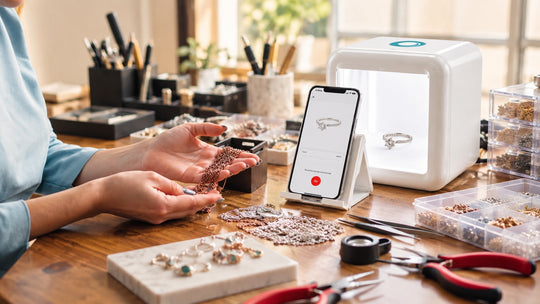
GemLightbox Mini, compact AI lightbox with 360 video, sparkle lights and Shopify upload |
$1,599 |
Travels to bench and counter, which is where it earns rather than in catalog volume |
|
Studio capture |
GemLightbox Pro, plug-and-play AI lightbox with Burst Mode and turntables |
$3,697 |
Needs dedicated bench space and pays back at volume |
|
Large studio capture |
GemLightbox Max, flagship with 2.5x capture area, 360 Infinity Lighting and RapNet integration |
Contact for pricing |
Built for full collections and wholesale, which is more capability than a small catalog uses |
|
Dedicated camera |
GemCam Pro, purpose-built jewelry camera for true color and detail |
$3,499 |
Highest fidelity on colored stones and engraving, paired with a lightbox rather than standalone |
|
Complete studio |
Elite Kit Pro, GemLightbox Pro plus GemCam Pro |
$6,499 |
Single purchase rather than assembled over time |
|
Software layer |
GemStudio, AI model and lifestyle visuals from a single product photo |
Subscription |
Replaces model shoots running $1,500 to $3,000, and cuts content production time by 40 to 60% |
Two honest points about the spend.
Hardware is a one-time cost against a recurring problem. A studio setup pays back across every subsequent catalog run, which makes catalog volume the number that decides whether it makes sense rather than the sticker price on its own.
Software is a recurring cost against a recurring saving. GemStudio earns against model shoot budgets and production hours, so the calculation depends on how often you would otherwise commission that work.
Which Setup Fits Your Situation?
Match the setup to where your capture actually happens and what you publish, rather than to a budget tier. Most operations land in more than one row here, which is the expected result rather than a contradiction.
|
Your situation |
What to solve first |
Setup that fits |
|
Selling on Etsy or Shopify with a small catalog, capture happens wherever there is space |
Consistency and color accuracy |
GemSparkle for portable capture, GemStudio for lifestyle output |
|
Running regular collection drops, capture happens in one place |
Throughput and publishing integration |
GemLightbox Pro, with GemStudio for worn frames |
|
Full collections and wholesale, images feed multiple channels |
Volume, motion and trade platform integration |
GemLightbox Max, GemCam Pro for high-value inventory |
|
Custom and bespoke work, capture follows the build |
Color fidelity and detail at every stage |
Elite Kit Pro, GemLightbox Mini at the bench |
|
Colored stone or high-value inventory where images carry the sale |
True color and macro detail |
GemCam Pro paired with GemLightbox Pro or Max |
|
Selling happens at the counter, trade shows and in client messages |
Reach beyond the studio |
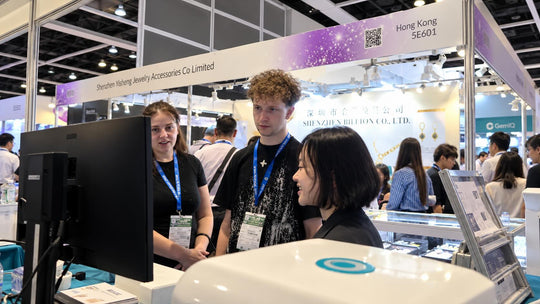
GemLightbox Mini alongside your studio setup, GemSparkle in the pocket |
The row that catches most operators out is the last one. A studio answers catalog volume well and stays where it is, so the moments that happen at the counter or in an evening client message need something that travels. That is an addition to the studio rather than a replacement for it, and it is usually the gap that costs the most revenue while being the cheapest to close.
Start with your seven criteria, rank them honestly against your own week, and the setup answers itself.
[Suggest an image here; make it relevant, or closest to relevance]
Sources
-
Etsy Help, Requirements and Best Practices for Images in Your Etsy Shop — https://help.etsy.com/hc/en-us/articles/115015663347-Requirements-and-Best-Practices-for-Images-in-Your-Etsy-Shop
-
Google Merchant Center Help, Image link [image_link] — https://support.google.com/merchants/answer/6324350?hl=en
-
Google Merchant Center Help, How to fix: Image too small — https://support.google.com/merchants/answer/12159030?hl=en
-
Shopify Help Center, Product media types — https://help.shopify.com/en/manual/products/product-media/product-media-types