Every jeweler has the same jewelry photography problem, and the solution to it is not what most content on the internet suggests.
The problem: dedicated jewelry cameras like GemCam Pro live in the studio. They belong there. They produce the hero shots, the macro detail work, and the ecommerce catalog assets that require professional-grade precision. That is what they are built for and what they do exceptionally well.
But most jewelry sales moments do not just happen in the studio.
They mostly happen at the counter, at the sales floor, during a customer walk-in, at the point of a repair reveal, or in the moment a supplier drops off a fresh parcel. In those moments, the camera in the jeweler's hand is a smartphone. Not because the smartphone is preferable to the dedicated camera. Because the smartphone is what is physically present.
The question is not whether to use the phone. The question is how to set the phone up so it produces sales-floor-worthy captures when the moment requires it.
Here is the setup that works.
Why the sales floor deserves its own capture workflow
The sales floor is where jewelry sales conversations actually happen. A customer sees a piece in the case and wants a photo to think about it. A repair comes back from the bench and needs to go out to the customer within the hour. A consigned piece arrives and needs to be documented before it hits the safe. A colored gemstone catches the light in a way that will not read on your regular ecommerce shot, and you want to capture that moment.
None of these are studio-production moments. All of them are revenue-adjacent. Every one of them costs you something specific when the capture is bad. The customer sees an off-color phone snap and cools on the piece. The repair reveal never gets sent. The consigned piece sits undocumented. The colored gemstone moment passes.
The dedicated studio is not the fix, because the dedicated studio does not follow you to the sales floor. What fixes the problem is a sales-floor capture surface that works with the phone that is already in your hand.

The 5-part sales floor phone setup
The setup below is what turns your phone from a snapshot device into a sales-floor capture surface. Not to replace the studio, and not to replace the dedicated jewelry camera. To catch the moments the studio and the dedicated camera cannot follow.
Part 1: Consistent lighting. The single biggest gap between a phone snap and a professional-quality capture is the light. Fluorescent ceiling lights, mixed daylight from a storefront window, warm counter spots, and glare from glass cases all produce off-color, shadow-heavy captures that flatten the piece. The fix is not a better phone. It is a controlled light environment the phone can capture into.
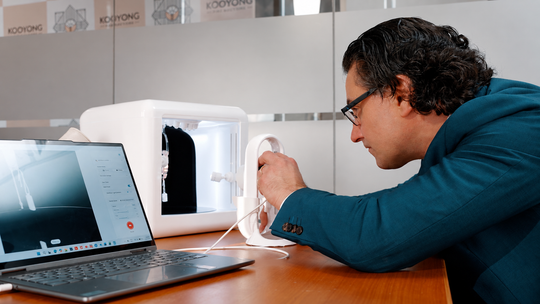
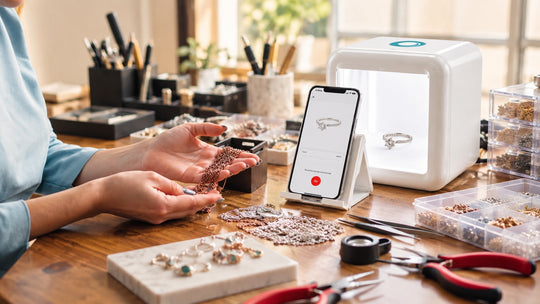
GemLightbox Mini is the added tool that provides this environment on the sales floor. Compact enough to sit permanently on the counter or the bench. 5000K to 5500K color temperature. CRI 95+ for accurate color rendering. Infinity lighting that produces the floating, shadowless look that reads as professional the instant the phone captures it. The phone provides the imaging. GemLightbox Mini provides the environment. Together they produce captures that read as sales-floor professional.
Part 2: A repeatable capture surface. Free-hand phone captures produce inconsistent framing, focus that drifts, and blurred stones. The fix is a fixed capture surface where the piece sits and the phone is positioned above it. Mini includes a phone stand and holders for necklaces, earrings, and other piece types. The setup takes 15 seconds. The capture is repeatable every time.
Part 3: One-tap trigger. The moment on the sales floor moves fast. A customer is waiting. A repair pickup is due. You do not have 90 seconds to fiddle with camera settings. Mini uses one-tap capture through the GemIQ app. The phone connects via Bluetooth. You press once. Photo and 360 video capture together. The whole sequence takes under 30 seconds.
Part 4: Automatic cleanup. A raw phone photo still needs background removal, color correction, and retouching before it goes anywhere near a customer. On the sales floor, you do not have time for post-production. The GemIQ app handles the cleanup inline. AI background removal. GemBrush retouching. The capture that comes out of your phone is ready to send.
Part 5: A one-click share. The moment the capture is ready, it needs to go somewhere. To the customer. To the ecommerce site. To Shopify. To a branded share page you can text or DM. Mini's software layer handles all of this. One click Shopify upload. Branded share pages. AI-generated descriptions if you want them. The capture becomes a sellable asset within 60 seconds of the moment happening.
Five parts. One added tool. A phone that is now a sales-floor capture surface.

Where this setup does and does not belong
This setup is not a replacement for your dedicated studio production workflow. GemLightbox Pro and GemLightbox Max remain the dedicated studios where the scheduled ecommerce and catalog work happens. GemCam Pro remains the dedicated jewelry camera for the macro detail work and the hero shots that require professional-grade precision. The sales-floor setup does not compete with any of these. It extends the workflow into the moments they cannot physically reach.
The right way to think about it: your studio and your dedicated camera handle the planned work. Your phone plus GemLightbox Mini handle the unplanned work. Two capture workflows. Different jobs. Same visual quality standard.
Independent jewelers who add the sales-floor setup to their existing workflow will spend the rest of 2026 catching the customer conversations, the repair moments, and the sales-floor captures that used to end up as off-color phone snaps. The retailers who wait for every moment to fit the studio schedule will keep losing the ones that do not wait.
The moments are already happening.
Your phone is already there.
The setup is what makes it capture-ready.
Sources
- GemIQ, GemLightbox Mini product documentation and specifications — https://gemiq.com/pages/gemlightbox-mini
- GemIQ, GemLightbox Pro and GemLightbox Max product documentation — https://picupmedia.com
- National Jeweler, Industry coverage on independent jewelry retail operations and workflow — https://nationaljeweler.com/
- INSTORE Magazine, Independent jewelry retailer sales floor and customer moment coverage — https://instoremag.com/